*주의!* 작년에 정리하지 못했던 Project Joing의 문서입니다. 포스팅은 아래의 순서로 진행될 예정입니다.
- 이미지 생성 모델 선정 3 - Flux.1 Schnell vs Flux.1 Dev
- Flux.1 Dev Fine-tuning: LoRa & PEFT
- Flux.1 Dev Fine-tuning: AI-Toolkit
- Flux.1 Dev Fine-tuning:
학습데이터 수집학습 데이터 확보와 학습 계획 - 2 - Flux.1 Dev Fine-tuning: 학습과정 및 결과 비교
- 마무리 및 회고
학습계획 작성 이후에 Caption 생성과 테스트 학습을 진행했다.
Caption 생성
Caption 생성의 경우 AI-Toolkit에서도 사용한 Florence-2 모델을 활용했다.
간단하게 Florence-2 모델의 경우 주어진 이미지에 대한 아래의 4가지 태스크를 진행할 수 있다.
# OD는 Object Detection으로 사진안의 사물을 찾아낸다.
prompt = "<OD>"
# CAPTION은 간단한 한줄 설명을 생성한다.
prompt = "<CAPTION>"
# DETAILED_CAPTION의 경우 구체적인 설명을 생성한다.
prompt = "<DETAILED_CAPTION>"
# MORE_DETAILED_CAPTION의 경우 더 구체적인 설명을 생성한다.
prompt = "<MORE_DETAILED_CAPTION>"
(구체적인 예시를 바탕으로한 비교의 경후 추후 업데이트 될 예정입니다.)
Caption을 생성하는 부분은 아래와 같이 작성하여 Caption 생성을 진행했다.
## Caption 생성 이미지 선정
# list of images
image_list = [image for image in os.listdir(HUNDRED_IMG) if image.endswith(".png")]
# list of correlated text files
text_list = [text.split(".")[0] for text in os.listdir(HUNDRED_IMG) if text.endswith(".txt")]

print(f"Number of images: {len(image_list)}")
print(f"Number of text files: {len(text_list)}")

image_needs_update = []
for image in image_list:
  if (image.split(".")[0] not in text_list):
    image_needs_update.append(image)

print(f"Number of images needs update: {len(image_needs_update)}")

## Caption 생성
prompt = "<DETAILED_CAPTION>"

for image_file in image_needs_update:
  # image setting
  image = Image.open(os.path.join(HUNDRED_IMG, image_file)).convert("RGB")
  inputs = processor(text=prompt, images=image, return_tensors="pt").to(device, torch_dtype)

  # getting a description about the image by Florence-2
  generated_ids = model.generate(
    input_ids=inputs["input_ids"],
    pixel_values=inputs["pixel_values"],
    max_new_tokens=1024,
    num_beams=3,
    do_sample=True
  )
  generated_text = processor.batch_decode(generated_ids, skip_special_tokens=False)[0]
  parsed_answer = processor.post_process_generation(generated_text, task="<DETAILED_CAPTION>", image_size=(image.width, image.height))
  generated_description = "[trigger] " + parsed_answer[prompt]

  # result
  display(image)
  print(generated_description)
  # saving the description about the image
  text_file = image_file.split(".")[0] + ".txt"
  text_file_path = os.path.join(HUNDRED_IMG, text_file)
  with open(text_file_path, "w") as file:
    file.write(generated_description)
Colab을 기반으로 작성했다보니 전체 내용을 다 올리기가 어려워 구체적인 코드는 아래의 Github 저장소에서 확인하는 게 좋다.
Github 주소: data_preprocessing/flux_image_preporcessing_florence.ipynb
flux_fine_tuning_joing/data_preprocessing/flux_image_preporcessing_florence.ipynb at main · jwywoo/flux_fine_tuning_joing
Contribute to jwywoo/flux_fine_tuning_joing development by creating an account on GitHub.
github.com
모델관련 구체적인 사용법과 설명은 아래의 링크에서 확인할 수 있다.
HugginFace Florence-2 Large 주소: microsoft/Florence-2-large
microsoft/Florence-2-large · Hugging Face
Florence-2: Advancing a Unified Representation for a Variety of Vision Tasks Model Summary This is a continued pretrained version of Florence-2-large model with 4k context length, only 0.1B samples are used for continue pretraining, thus it might not be tr
huggingface.co
테스트 학습을 위한 config.yaml 수정
그다음으로 AI-Toolkit의 config.yaml을 아래와 같이 수정하여 테스트 학습을 진행했다.
(업로드 예정)
그리고 테스트 학습을 진행하자마자 문제들이 발생했다.
문제상황 1 Trigger Word 인식 불가 및 사진과 같은 그림
1차 테스트 학습의 결과는 아래의 링크에서 확인할 수 있다.
Hugging Face 주소: jwywoo/storyboard-generator-model-joing-demo
jwywoo/storyboard-generator-model-joing-demo · Hugging Face
storyboard-generator-model-joing-demo Model trained with AI Toolkit by Ostris Trigger words You should use SGMJD to trigger the image generation. Download model and use it with ComfyUI, AUTOMATIC1111, SD.Next, Invoke AI, etc. Weights for this model are ava
huggingface.co


중간의 사진을 재외 한 나머지 사진에서 알 수 있듯이 같은 Trigger였음에도 불구하고 색이 추가됐다. 그리고 스케치보다는 정말 사진과 같다. 이 문제를 해결하기 위해 다양한 Prompt를 사용했었다. 그리고 한 가지 알게 된 사실은 Trigger에 추가적으로 black and white color illustration이라는 내용을 추가하는 것이었다.
(빈약한 설명 정말 죄송합니다. 자료가 너무 많이 유실 됐습니다.)
문제상황 2 학습데이터의 스타일 적용 실패
위의 수정사항을 적용한 후의 결과는 아래의 링크에서 확인할 수 있다.
Hugging Face 주소: jwywoo/storyboard-scene-generation-model-flux-v2
jwywoo/storyboard-scene-generation-model-flux-v2 · Hugging Face
storyboard_scene_generation_model_flux_v2 Model trained with AI Toolkit by Ostris Trigger words You should use SSGMFV2 to trigger the image generation. Download model and use it with ComfyUI, AUTOMATIC1111, SD.Next, Invoke AI, etc. Weights for this model a
huggingface.co
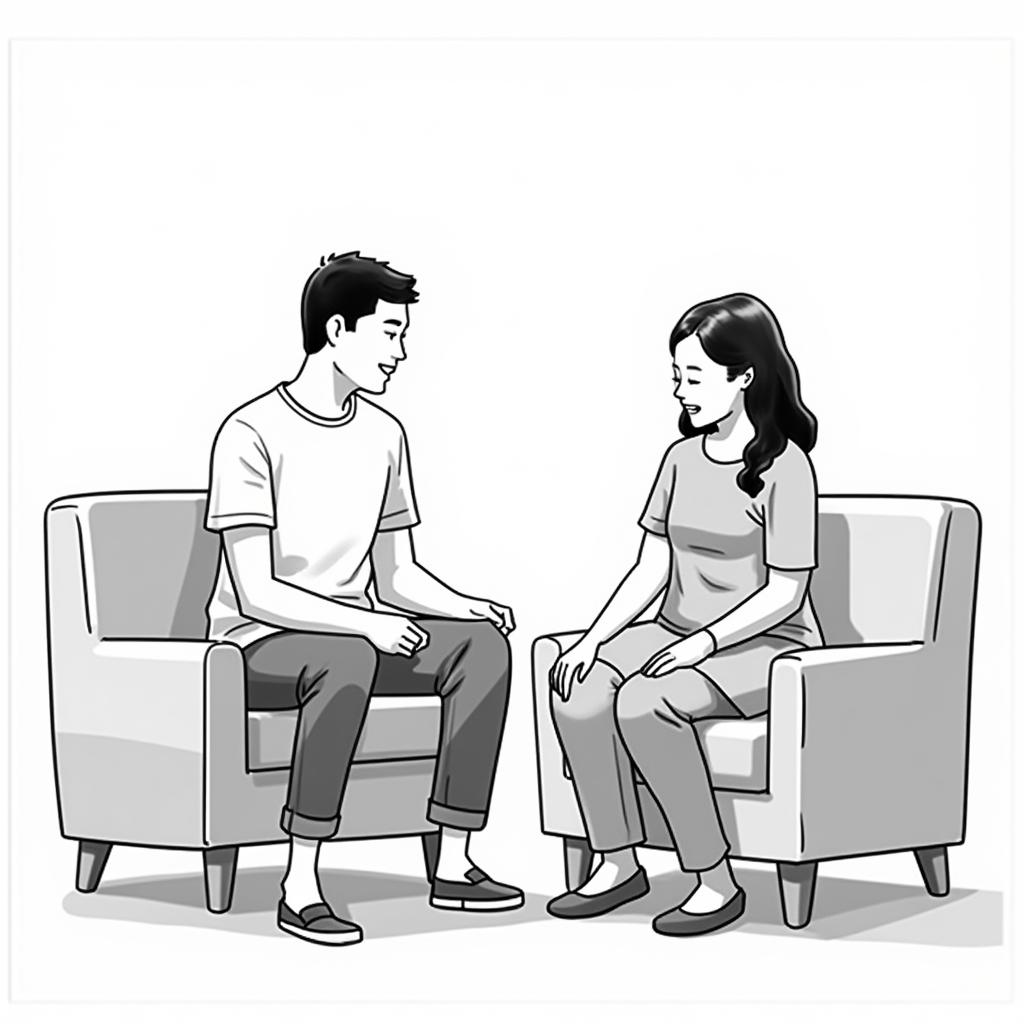


이번의 경우에는 확실하게 사진이 아닌 스케치처럼 출력이 됐다. 하지만 이번에는 학습데이터에서 사용된 그림 양식이 아니었고 추가적으로 데이터에 대한 변형이 없었기 때문에 이는 학습데이터가 아닌 단지 입력 Prompt의 변화로 인한 차이였다. 즉, Prompt의 수정이 가하는 순간 다시 사진과 같이 나오는 문제가 발생했다.
이 문제를 해결하기 위해 가장 먼저 적용한 내용은 Caption 전처리였다. 생성된 Caption의 내용을 보면 일관적이지 않은 사진 설명이 들어가 있었다. 예를 들어 하나의 사진에서 'Picture', 'Portrait', 'Image'와 같은 표현들이 사용됐었고 이를 위해서 아래와 같은 전처리 과정을 추가하여 일정한 내용의 Caption이 나올 수 있도록 유도했다.
## Replace every "photo" & "image" -> drawings
for file_name in os.listdir(FIFTY_IMG):
  if file_name.endswith(".txt"):
    file_path = os.path.join(FIFTY_IMG, file_name)
    with open(file_path, "r", encoding="utf-8") as f:
      content = f.read().strip()
    content = content.replace("photo", "drawings")
    content = content.replace("image", "drawings")
    with open(file_path, "w", encoding="utf-8") as f:
      f.write(content)
이후 생성된 결과는 아래와 같다.


왼쪽과 오른쪽 사진은 같은 Prompt 다른 모델이다. 굵은 선표현과 머리카락 표현이 학습데이터와 유사하고 스케치 스타일 또한 많이 유사하다는 걸 알 수 있다. 물론 수정사항이 아직 많은 상태이지만 처음 의도 했던 스타일 학습은 어느 정도 달성했다고 볼 수 있다.
다음으로는 문제상황들을 적용한 내용을 추가적으로 수정하여 학습 계획에 맞춰 진행한 과정들에 대해 정리할 예정이다.
다시 한번 부족한 설명 정말 죄송합니다.
Flux.1 Dev Fine-tuning: 학습과정 및 결과 비교
Project Joing: StoryBoard Generator(콘티 생성기) Flux.1 Dev Fine-tuning: 학습과정 및 결과 비교
*주의!* 작년에 정리하지 못했던 Project Joing의 문서입니다. 포스팅은 아래의 순서로 진행될 예정입니다.이미지 생성 모델 선정 3 - Flux.1 Schnell vs Flux.1 DevFlux.1 Dev Fine-tuning: LoRa & PEFTFlux.1 Dev Fine-tuning
youcanbeable.tistory.com